Saturday, December 17, 2011

CIS(theta) 2011-2012 - Scaling the Cluster! - Meeting VII

The following is a summary of what we've accomplished so far with the 2011-2012 CIS(theta) team. Our new Shadowfax Cluster is coming along quite well. We have a nice base OS in the 64bit Ubuntu 11.04 Natty Narwhal Desktop on top of our AMD dualcore Athlons and gigE LAN. The Unity Desktop isn't that different from the Gnome Desktop we've been using these past few years on Fedora and Ubuntu. Natty is proving very user friendly and easy to maintain! We installed openMPI and we used flops.f to scale our cluster up to 50 cores! Remember, we needed openSSH public keys so openMPI can scatter/gather cluster jobs without the overhead of logging into each node as needed. We created a user common to all cluster nodes called "jobs" in memory of Steve Jobs so the cluster user can simply log into one node and be logged into all nodes at once (you can actually ssh into each node as "jobs" without specifying a userid or passwd)!
InstantCluster Step 1: Infrastructure
Make sure your cores have enough ventilation. The room has to have powerful air conditioning too. These two factors may seem trivial but will become crucial when running the entire cluster for extended periods of time! Also, you need to have enough electrical power, preferably with the cabling out of the way, to run all cores simultaneously. Don't forget to do the same with all your Ethernet cabling. We have CAT6E cables to support our gigE Ethernet cards and switches. We are lucky that this step was taken care of for us already!

InstantCluster Step 2: Hardware
You need up to date Ethernet switches plus Ethernet cards and cores as well as plenty of RAM in each Linux box. As stated above, our gigE LAN and switches were already setup for us. Also, we have 64bit dual-core AMD Athlons and our HP boxes have 2GB of RAM. We are still waiting for our quad-core AMD Phenom upgrade!

InstantCluster Step 3: Firmware (Meeting III)
We wasted way too much time two years ago (2009-2010 CIS(theta)) trying out all kinds of Linux distros looking for a good 64bit base for our cluster. Last year (2010-2011 CIS(theta)) we spent way too much time testing out different liveCD distros. Last year, we also downgraded from 64bit Ubuntu 10.04 Desktop edition to the 32bit version on our Linux partitions. 64bit gives us access to more RAM and a larger maxint, but was proving to be a pain to maintain. Just to name one problem, jre and flash were hard to install and update on FireFox. Two years ago, we tried Fedora, Rocks, Oscar, CentOS, Scientific Linux and, finally, Ubuntu. We've done this several times over the years using everything from Slakware and KNOPPIX to Fedora and Ubuntu! This year, 64bit Ubuntu has proven very easy to use and maintain, so I think we'll stick with it for the cluster!

InstantCluster Step 4: Software Stack I (Meeting IV)
On top of Ubuntu we need to add openSSH, public-key authentication (step 4) and openMPI (step 5). Then we have to scale the cluster (step 6). In steps 7-10, we can discuss several applications to scatter/gather over the cluster whether it be graphical (fractals, povray, blender, openGL, animations) or number crunching (C++ or python app for Mersenne Primes or Beal's Conjecture). So, what follows is a summary of what we did to get up to plublic-key authentication. This summary is based on the http://cs.calvin.edu/curriculum/cs/374/MPI/ link listed below. First, we installed openSSH-server from http://packages.ubuntu.com, then:
  1. If you have no .ssh directory in your home directory, ssh to some other machine in the lab; then Ctrl-d to close the connection, creating .ssh and some related files. 
  2. From your home directory, make .ssh secure by entering:
    chmod 700 .ssh
  3. Next, make .ssh your working directory by entering:
    cd .ssh
  4. To list/view the contents of the directory, enter:
    ls -a [we used ls -l]
  5. To generate your public and private keys, enter:
    ssh-keygen -t rsa
    The first prompt is for the name of the file in which your private key will be stored; press Enter to accept the default name (id_rsa).The next two prompts are for the password you want, and since we are trying to avoid entering passwords, just press Enter at both prompts, returning you to the system prompt.
  6. To compare the previous output of ls and see what new files have been created, enter:
    ls -a [we used ls -l]
    You should see id_rsa containing your private key, and id_rsa.pub containing your public key.
  7. To make your public key the only thing needed for you to ssh to a different machine, enter:
    cat id_rsa.pub >> authorized_keys
    [The Linux boxes on our LAN, soon to be cluster, have IPs ranging from 10.5.129.1 to 
    10.5.129.24 So, we copied each id_rsa.pub file to temp01-temp24 and uploaded these 
    files via ssh to the teacher station. Then we just ran cat tempnn >> authorized_keys 
    for each temp file to generate one master authorized_keys file for all nodes that we could 
    just download to each node's .ssh dir.]
  8. [optional] To make it so that only you can read or write the file containing your private key, enter:
    chmod 600 id_rsa [optional] To make it so that only you can read or write the file containing your authorized keys, enter: chmod 600 authorized_keys
InstantCluster Step 5: Software Stack II (Meeting V)
We then installed openMPI (we had a lot less dependencies this year with Natty 11.04 64bit) and tested multi-core with flops. Testing the cluster as a whole will have to wait until the next meeting when we scale the cluster! We followed openMPI install instructions for Ubuntu from http://www.cs.ucsb.edu/~hnielsen/cs140/openmpi-install.html
These instructions say to use sudo and run run apt-get install openmpi-bin openmpi-doc libopenmpi-dev However, the way our firewall is setup at school, I can never update my apt-get sources files properly. So, I used http://packages.ubunutu.com and installed openmpi-bin, gfortran and libopenmpi-dev. That's it!
Then we used the following FORTRAN code to test multi-core. FORTRAN, really? I haven't used FORTRAN77 since 1979! ...believe it or don't!
We compiled flops.f on the Master Node (any node can be a master):
mpif77 -o flops flops.f
and tested openmpi and got just under 800 MFLOPS using 2 cores (one PC):
mpirun -np 2 flops
Next, we generated a "machines" file to tell mpirun where all the nodes (Master and Workers) are (2 PCs or nodes with 2 cores each for example):
mpirun -np 4 --hostfile machines flops
Every node has the same "machines" text file in /home/jobs listing all the IPs, one per line. Every node has the same "flops" executable file (or whatever your executable will be) in /home/jobs. Every node has the same "authorized_keys" text file with all 25 keys in /home/jobs/.ssh 
Note: last year we got about 900 MFLOPS per node. This year we still have 64bit AMD athlon dualcore processors. However, these are new PCs, so these athlons have slightly different specs. Also, last year we were running Maverick 10.04 32bit ... and ... these new PCs were supposed to be quadcores! We are still awaiting shipment.
InstantCluster Step 6: Scaling the cluster
UPDATE: 2011.1126 (Meeting VI)
Including myself, we only had 3 members attending this week. So, we added 3 new nodes. We had nodes 21-24 working well last time. Now we have nodes 19-25 for a total of 7 nodes, 14 cores and over 5 GFLOPS! This is how we streamlined the process: 
(1) adduser jobs and login as jobs 
(2) goto http://packages.ubuntu.com and install openssh-server from the natty repository 
(3) create /home/jobs/.ssh dir and cd there 
(4) run ssh-keygen -t rsa 
(5) add new public keys to /home/jobs/.ssh/authenticated_keys to all nodes 
(6) add new IPs to /home/jobs/machines to all nodes
(7) goto http://packages.ubuntu.com and install openmpi-bin, gfortran and libopenmpi-devfrom the natty repository
(8) download flops.f to /home/jobs from our ftpsite compile and run: 
mpif77 -o flops flops.f and 
mpirun -np 2 flops or 
mpirun -np 4 --hostfile machines flops 
NB: since we are using the same hardware, firmware and compiler everywhere, we don't need to recompile flops.f on every box, just copy flops from another node!
(9) The secret is setting up each node identically:
/home/jobs/flops
/home/jobs/machines
/home/jobs/.ssh/authenticated_keys


UPDATE: 2011.1214 (Meeting VII)
We had 5 members slaving away today. Nodes 19-25 were running at about 5 GFLOPS last meeting. Today we added nodes 10, 11, 12, 17 and 18. However, we ran into some errors when testing more than the 14 cores we had last time. We should now have 24 cores and nearly 10 GFLOPS but that will have to wait until next time when we debug everything again....
===================================================
What we are researching IV 
(maybe we can use Python on our MPI cluster?):
What we are researching III 
(look at some clustering environments we've used in the past):
We used PVM PVMPOV in the 1990s.
Let's try out openMPI and Blender now!


http://www.blender.org


===================================================
What we are researching II 
(look what other people are doing with MPI):
MPI intro, nice!
Sample MPI code
http://www.cc.gatech.edu/projects/ihpcl/mpi.html
===================================================
What we are researching I 
(look what this school did in the 80s and 90s): 
Thomas Jefferson High courses
Thomas Jefferson High paper
Thomas Jefferson High ftp
Thomas Jefferson High teacher
http://www.tjhsst.edu/~rlatimer/
===================================================
Today's Topic:
CIS(theta) 2011-2012 - Scaling the Cluster! - Meeting VII
Today's Attendance:
CIS(theta) 2011-2012: GeorgeA, GrahamS, KennyK, LucasE; CIS(theta) 2010-2011: HerbertK
Today's Reading:
Chapter 4: Building Parallel Programs (BPP) using clusters and parallelJava
===================================================
Well, that's all folks, enjoy!

Saturday, December 10, 2011

Quarter II, Week 5: ScreenCasts, SmartNotes and Code, oh my!

AP Computer Science spent all week working on Lab 6 about boolean operators and predicate methods! Calculus Research Lab just finished Lab 4 on derivatives involving ln(x) and e^x. Computer Math finished Lab 4 on iteration.


preCalculus finished CH6 and CH7 reviewing trigonometry and then we had a test.
pre701 Trig Identities


pre708 Trig Equations


AP Calculus BC continued CH6 about volumes of revolution!
bc602 Disks in dx


bc603 Disks in dy


bc604 Washers in dx and dy

HTH and I hope you enjoyed this week's notes!


Learning with Technology, 

Friday, December 9, 2011

The Great YouTube ReDesign of 2011!

What the heck is with YouTube lately??? Have you noticed that a lot of the channels have been redesigned? My students say that their channels were forced to change. I'm a YouTube partner, so I had a choice. However, YouTube has been hounding me with emails every day for a month about the benefits of switching so, I did. The redesign amounted to my renaming both my YouTube channels, changing backgrounds and avatars and selecting a home screen style. I chose a home style that looks more like a blog.


For my primary YouTube channel, http://www.youtube.com/calcpage2009, I changed the name from "You Can Learn AP Calculus!" to "Shadowfax Computing ScreenCasts!" This is the channel where I post screencasts that I produce myself in class. The obvious choice of avatar was the Lord of all Horses herself. The background is a picture I took with my DroidX cellphone of my classsroom aka PC lab.


For my alternate YouTube channel, http://www.youtube.com/cistheta2007, I changed the name from "Dox for class!" to "YouTube Wednesday: Dox and Filks for class!" Here I post math and computer related filks from my students. I also post documentaries I converted for YouTube from old VHS tapes. So, the obvious choice of avatar was the great Admiral herself! The background is clearly a fractal!

So, of course, all my YouTube links are ruined! Let's see if we can find some new ones, shall we?


Math related filks and dox on YouTube by others
http://www.youtube.com/playlist?list=FLbKbsOreuU_m062NQ1o-ekA&feature=plcp
Math related filks on YouTube by my students
http://www.youtube.com/playlist?list=PL8E2A8DE4C0DA6B2A&feature=plpp
Math related dox I saved for YouTube from VHS oblivion
(work in progress)
Math related ScreenCasts for YouTube and SmartNotes for Slideshare I made in class
* SmartNotes, 2011-2012:
http://www.slideshare.net/calcpage2011
* preCalculus, 2010-2011:
http://www.youtube.com/playlist?list=PLD30F06ABDC2510BF&feature=plpp
* Harvard Calculus I, Summer 2010:
http://www.youtube.com/playlist?list=PLC2C0DA026FAF0AE7&feature=plpp
* AP Calculus BC, 2009-2010:
http://www.youtube.com/playlist?list=PL870970B490D64876&feature=plpp
http://www.youtube.com/playlist?list=PLAA6688F60255BEFD&feature=plcp
* Harvard Calculus II, Summer 2009:
http://www.youtube.com/playlist?list=PLCAFA6B444BEC8E30&feature=plpp


Cluster related dox I found on YouTube
http://www.youtube.com/playlist?list=PLC7A0A7C25F58EF72&feature=plpp


Computer related filks and dox on YouTube by others
http://www.youtube.com/playlist?list=FL4klM8CmDiZeDp8GgVGOubA&feature=plpp
Computer related filks on YouTube by my students
http://www.youtube.com/playlist?list=PLFBA85F4CD27E8D4A&feature=plpp
Computer related dox I saved for YouTube from VHS oblivion
http://www.youtube.com/playlist?list=PL35534A5E32FB49A4&feature=plpp
Computer related ScreenCasts for YouTube and Code for Pastebin and SAGE I made in class
* Code, 2011-2012:
http://pastebin.com/u/calcpage
https://clemix.clemson.edu:34567/
* APCS, 2011-2012:
http://www.youtube.com/playlist?list=PL64DA018268EC0E2C&feature=plpp
* SAGE in High School:
http://www.youtube.com/playlist?list=PL2A43791D547F39FD&feature=plpp
* SAGE Conferences:
http://www.youtube.com/playlist?list=PLD4BC8D164FCCC49F&feature=plpp
* Computer Math:
(work in progres)
* Calculus Research Math:
(work in progress)

Note: (*) starred items are my own work

Well, that's all folks! Hope you enjoyed all my YouTube links.


Generally Speaking,

Sunday, December 4, 2011

Quarter II, Week 4: ScreenCasts, SmartNotes and Code, oh my!

AP Computer Science spent all week working on C5X15 Line.java playing with overloaded constructors and inheritance from the Object class!
C5X15 Line.java

C5X15a Line.java
C5X15b Line.java
C5X15c Line.java
C5X15 LineTester.java
C5X15 Line.java
Calculus Research Lab started derivatives of inverse functions.
CRL411 exp(x)
CRL417 ln(x)


View more documents from A Jorge Garcia

Computer Math spent all week on Lab 4!

preCalculus started CH6 reviewing trigonometry!
pre602 SOHCAHTOA
pre606 Trig Regression


AP Calculus BC started CH6 about definite integrals!
bc601 Area

HTH and I hope you enjoyed this week's notes!


Learning with Technology, 

Saturday, December 3, 2011

My 21st Century Classroom aka PC Lab!

OK, here's my brand spanking new extra wide SmartBoard 885xi. I've been trying to use this beast without the http://www.smarttech.com drivers for over a quarter of the year now. What a mistake, especially when I had to align the board! I've been using other pen apps, such as http://xournal.sourceforge.net, instead. These work fine with my Bluetooth tablet but are a little buggy on the SmartBoard directly. Whenever I tried to click on a new pen color or an eraser or a new page at the top of the screen, for instance, the pen drew a huge line to the top of the screen the next instant I tried to write below!

Another problem was that, here on my Teacher Station (front view), I was running 64bit Ubuntu 11.04 for our CIS(theta) Computing Independent Study cluster project, Shadowfax. So, I just installed a dual-boot partition with 32bit Ubuntu 11.10 from http://www.ubuntu.com. Now, we can easily reboot to the 64bit partition when running Shadowfax. However, for ordinary, daily work, I think I'll leave 32bit Ubuntu running with VTI and Smart Notebook. Note the blue flashing USB stick. That's a Bluetooth reciever for my Wacom Graphire 6x8 remote mouse tablet (aka Smart Airliner Slate). Also, the device on the left is the wireless mic reciever which plugs into the audio port in the front of the PC right next to the Bluetooth dongle. Further, next to that audio input cable is the audio output cable for the SmartBoard speakers.

So, I can control my SmartBoard via the Teacher Station (rear view) using Smart Notebook. I couldn't use Smart Notebook before as there's no version that works with 64bit! I also added the following to the Teacher Station: WINE for VTI, chromium for eschool, flash for youtube and slideshare, jre for screencast-o-matic and SAGE as well as IDLE for python. The 32bit version of Ubuntu auto-installed flash in firefox and icedtea instead of the standard jre from oracle. Icedtea is OK for most applications, but it seems to slow down Smart Notebook while I'm screencasting. I may have to uninstall icedtea and install standard java. Note the standard video, keyboard, mouse and Ethernet cables. In addition you'll note video, audio (port in front) and USB cables from the SmartBoard. Note the wireless receiver on the right. We use a video splitter (left) for output to the desktop monitor and the SmartBoard. The SmartBoard is 30 feet from the back of the room, so the USB connection has an Ethernet extender. BTW, this room is pretty big, its also 40 feet wide! That's why we can comfortably fit 24 electronic desktops as well as 24 wooden desktops for the students!

In addition to my station, there's 24 Student Stations as you can see above (front view). All 25 stations are HPs with dualcore 64bit AMD Athlon processors, 2 GB RAM and 250 GB HDD.

These Student Stations (rear view) are still running 64bit Ubuntu 11.04 edition. I just added WINE so my students can use VTI. The Teacher Station has vpython and IDLE. I may add vpython and IDLE to the Student Stations or the servers too. Note the small footprint of this box achieved by using an external power supply like a laptop which fits under the table.

I have a Uninterruptable Power Source (UPS) under my desk in the back of the room to power the Teacher Station and 2 servers in case of a power outage.

Also under my desk you will find the servers (front view). The one on the left is guardian and the one on the right is caprica. We replaced colossus and centauri last year, http://shadowfaxrant.blogspot.com/2010/10/cistheta-meeting-iv-2010-2011-rip.html. Our new servers are running 32bit Ubuntu 10.04 edition. Note the RAID drives!

Here's a rear view of the servers with caprica on the left and guardian on the right. Both servers have dualcore 32bit Intel Xeon processors with 2 GB RAM and nearly 500 GB HDD. Oh well, I was told they would be 64bit quadcores....

On my desk you will also see the monitor for guardian. Guardian is a ssh server where my students can login from school or from home to do their work in AP Computer Science. I added openSSH and jdk to this server so my students can login to do their classwork using javac, java, javadoc and appletviewer. BTW, we may make the Teacher Station into a LAMP server to run SAGE or add IDLE and vpython to guardian so my Computer Math and Calculus Research Lab students can also work on a private server from school or from home!

Right next to guardian's monitor you will see caprica's monitor. Caprica is a ftp server I set up to share files with my students. Actually, I'm using this server less and less as I use http://www.edmodo.com more and more. I use this server mostly for backups now. I added openSSH and vsFTP to this server so I can upload files as root (no other ssh accounts) and my students can download files via anonymous ftp. BTW, openSSH is also on all the Student Stations since the cluster uses public-key authenticated ssh.

We've been remodeling the room a bit over the last couple of years, so here's a random shot of the door in the right rear side of the room near my servers. All we are missing are some more marker boards we ordered last year that disappeared somehow!

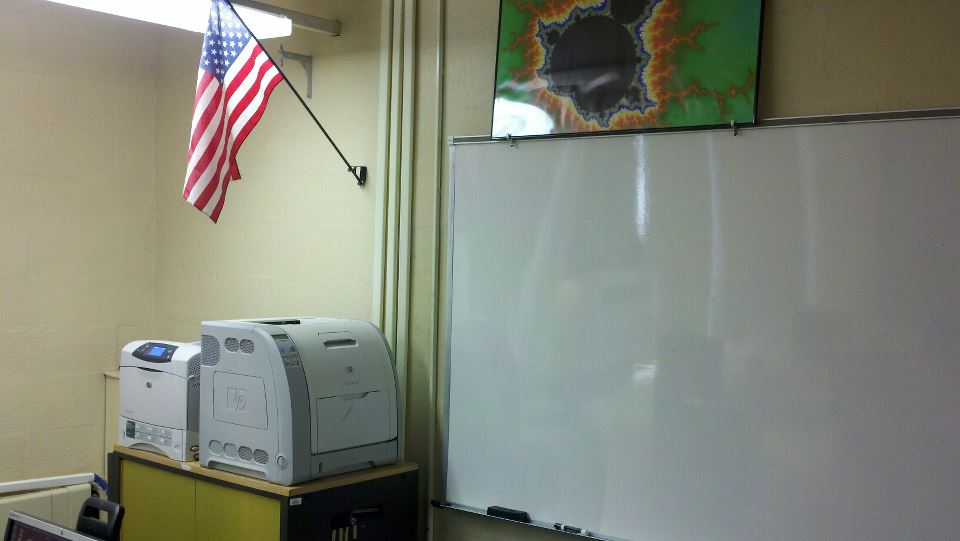
Here's another random pic of the front left corner of my room. We have 2 HP Laserjets. One is an HP LaserJet 4240 and the other is an HP Color LaserJet 3500C. The ceiling in this corner has a little water damage that needs patching. Remember the August earthquake, the September hurricane and the Halloween blizzard???

The front right corner of the room has an emergency power kill switch for the whole room. We need to fix this switch. It used to cut power to all 24 Students Stations, but it only does so for 16 stations now. Maybe, something got rewired over the summer? Gotta love that slide rule! How's your sig figs and scientific notation? Quick, what's 140 x 32?

Here's a view of the front left side of the room from the rear left side. Each row of desktops has a different background just for fun (Ubuntu Natty Narwahls in front, Hubble STI images in the middle and the Ubuntu Matrix in the back).

The left side of the room has a huge window with a big AC unit in the middle. Shades are drawn for Youtube Wednesday and Ted Tuesday! AC stays on even at night as the servers cook the room otherwise. When we run all cores on the cluster for any amount of time, it gets really, really hot in there too. BTW, we're still awaiting our quadcore upgrade on all the Student Stations plus the Teacher Station (64bit AMD phenom)! Hopefully, we can just swap out the hdds?

Here's a view of the front right side of the room from the rear right side next to the door. BTW, each student has 2 desktops: electronic and traditional. If they need a traditional wooden desktop, they simply slide their chair over. "Don't move the hardware, move your chair!"

Here's a view of the right side of the room from the AC unit. You will notice several hi resolution (6000x4000, 24 Mpixel) prints from http://www.zazzle.com of fractals and ray tracings we generated on our Linux Super Cluster, aka Super Computer, Shadowfax.

Finally, last but not least, we have a view of the front center of the room from the rear center near my desk, Teacher PC and servers! Note the Shadowfax background on my desktop! I teach from this perspective seated at my Teacher Station when teaching computing (Computer Math, AP Computer Science and Calculus Research Lab) as I'm writing sample code all the time. When I teach math (preCalculus and AP Calculus BC), I'm at the front of the room using the SmartBoard. BTW, I had to setup crontab to turn off all the students' ethernet cards during math class as I can't monitor the students' desktops from the front of the room as I can from the back! Also, I've been using http://www.screencast-o-matic.com with my wireless lapel mic for years now recording my classes for http://www.youtube.com/calcpage2009 from both the front and the back of the room.

Generally Speaking,